Apecoo
Native Mac app · Mac App Store

Find any file
as you type.

PathLift searches your whole Mac the moment you type, then gives you a fast dual-pane browser to copy, move, tag and tidy what you find.

Get it on the Mac App Store — $9.99Compare with PathLift Pro

Apple silicon · macOS 14+ · English and Simplified Chinese

PathLift icon
PathLift
Fast file search & dual pane
Smart fuzzy search with adaptive local ranking
Filters: ext:, type:, size:, mtime:, in:, tag:
Dual panes, tabs and Path Finder-style breadcrumbs
Disk usage, big files and duplicates

Search, then act, without leaving the keyboard.

Smart search, typos and all

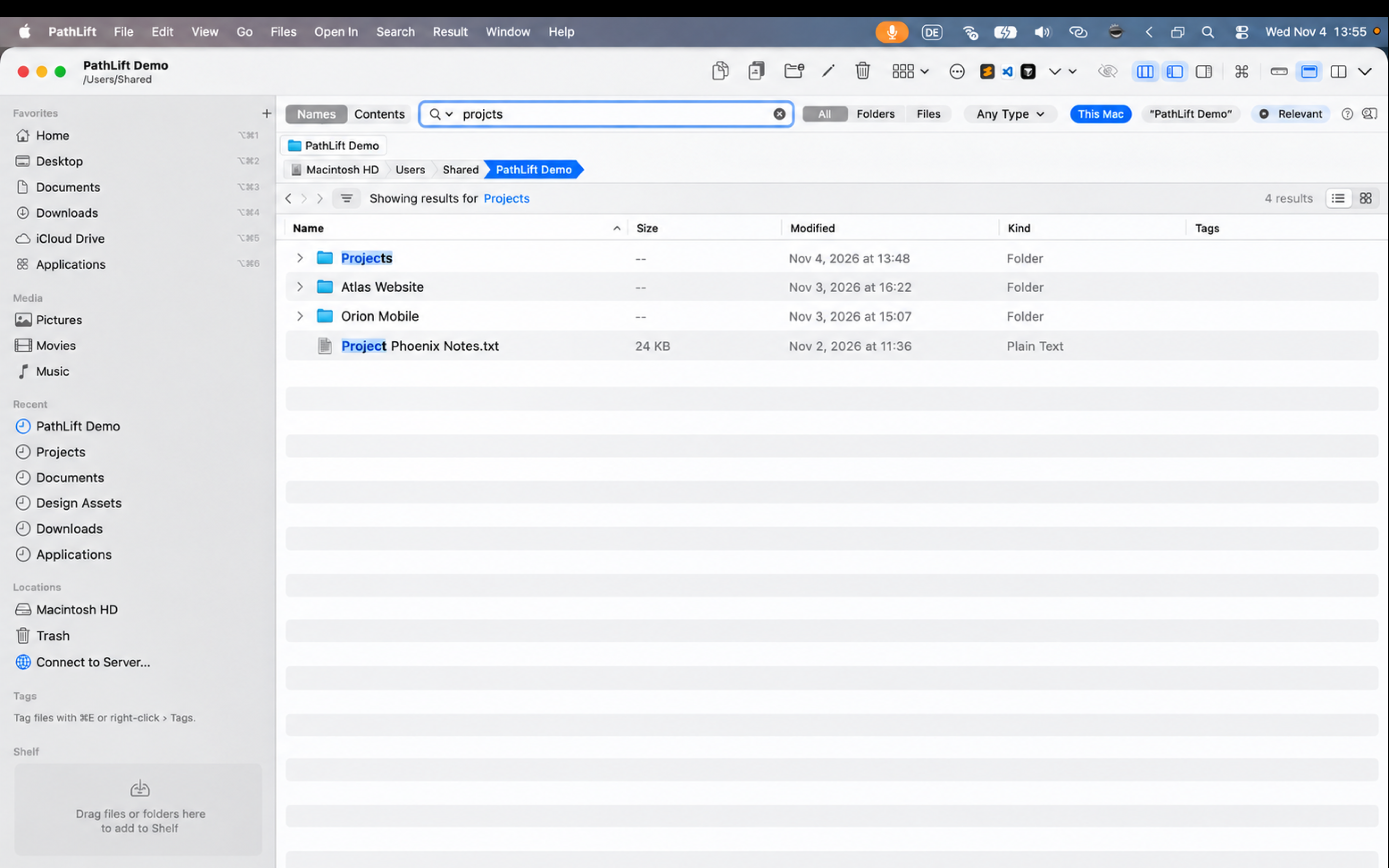
PathLift combines a dedicated, fsearch-inspired native index with fuzzy matching and private, on-device adaptive ranking. “projcts” still finds Projects, while recently chosen and frequently used folders rise toward the top.

Filters when you need them

Add ext:pdf, type:image, size:>100mb, mtime:<7d, in:~/Documents or tag:work to any search, or pick a type from the Any Type menu. “Only: .pdf 12 · .docx 3” narrows results in one click.

Search inside files

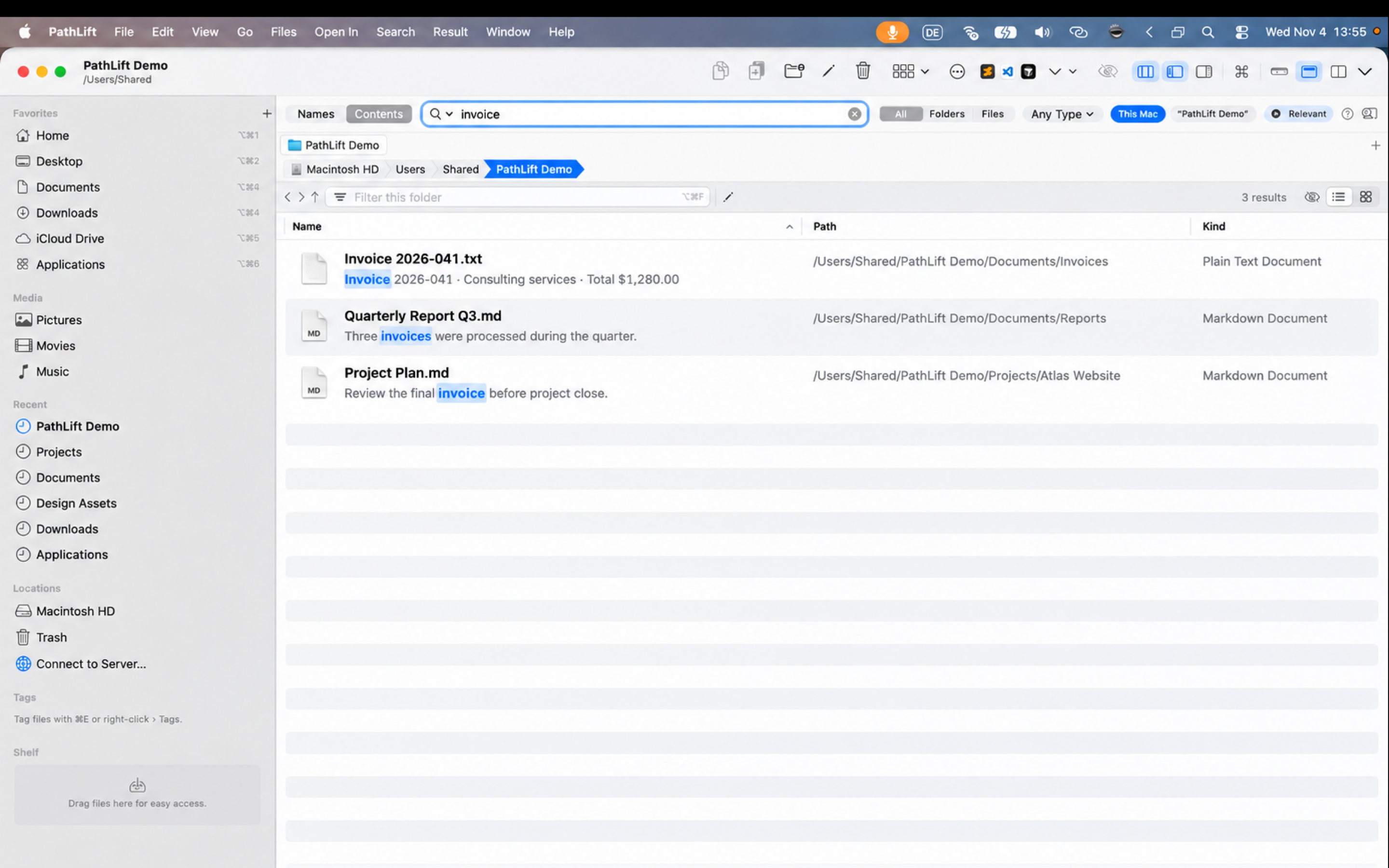
Find words in documents and code with PathLift's local content index, with the matching line shown under each file. PathLift Pro also offers ripgrep (rg) live search for code-heavy folders.

A dual-pane browser

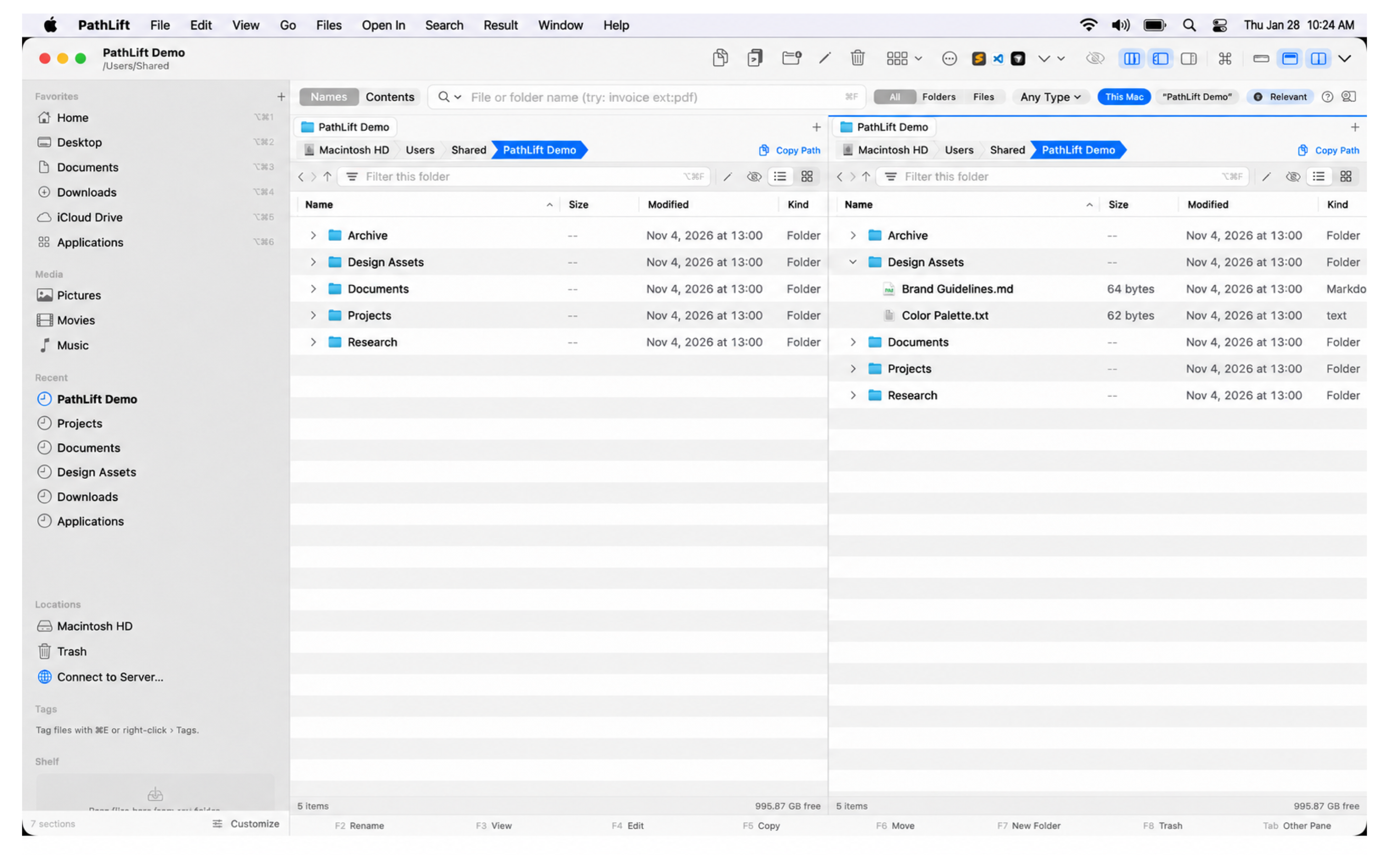
Tabs, F5 copy and F6 move between panes, Path Finder-style breadcrumbs, a Go to box that guesses where you mean, and favorites you drag into order.

Tools that save clicks

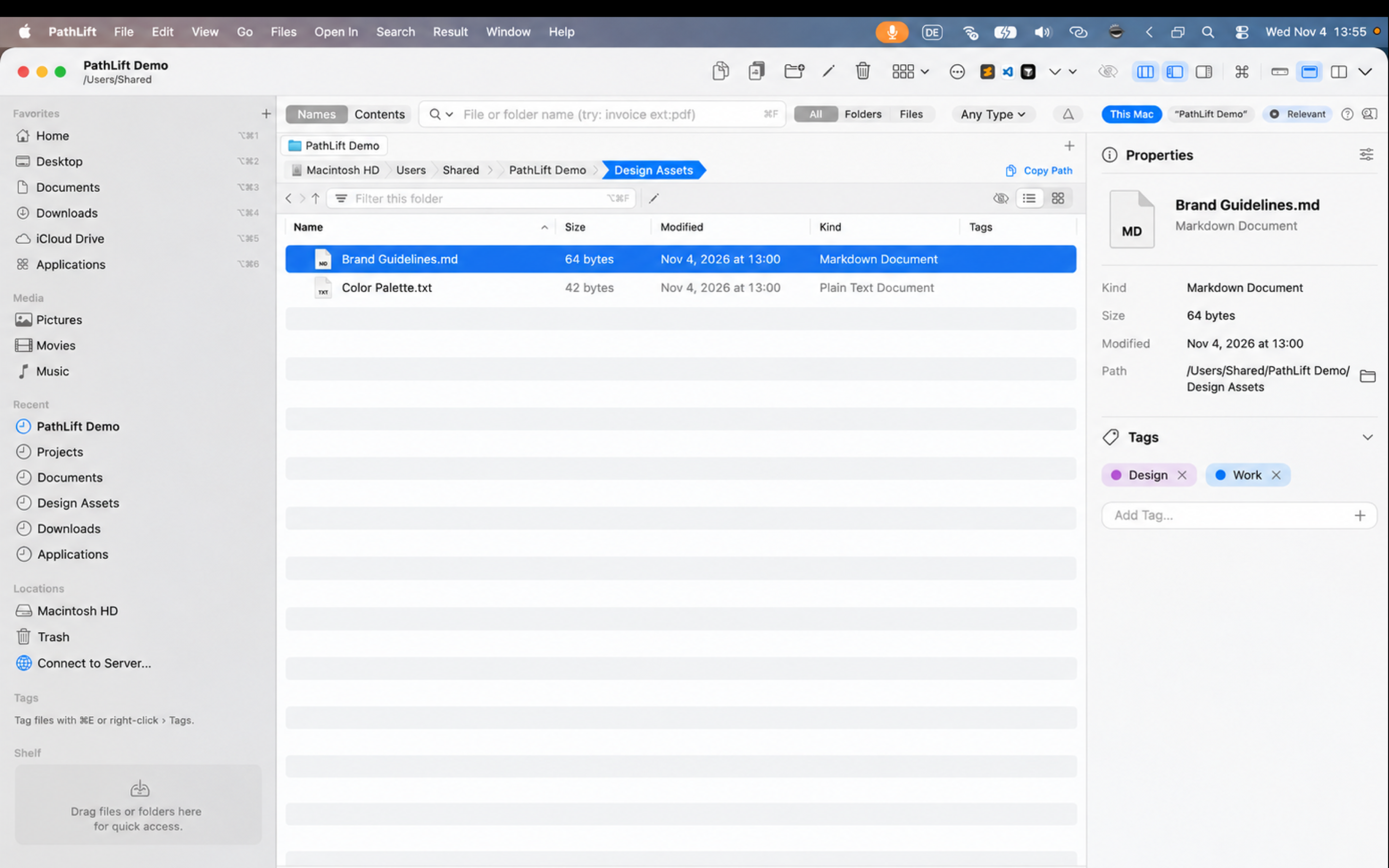
The Shelf gathers files from many folders; Select… picks by name, kind, size, date or tags; edit Finder tags in place; batch rename with a live preview; Trash with Put Back.

Keep your disk tidy

Folder sizes, the biggest files and duplicates you can safely move to the Trash. Undo brings anything back.

Optional AI, on your terms

Organize a messy folder with a plan you approve first, suggest tags, or search in plain words, with a local Ollama model or your own OpenRouter key.

Private by design

No account, no tracking, no analytics. The index, your tags and settings stay on your Mac.

See PathLift at work

Search first, then browse and act in the same window. All screenshots use fictional demo data.

Typo-tolerant name search in PathLift
Typo-tolerant name searchFuzzy matching handles typos, while private on-device ranking brings recent picks and frequently used folders closer to the top.
Search inside documents and code in PathLift
Search inside documents and codeSee the matching line, not just a filename. The App Store edition uses PathLift's local content index; Pro also offers ripgrep live search.
Two panes, fewer context switches in PathLift
Two panes, fewer context switchesBrowse, compare, copy and move without opening another Finder window.
Properties and Finder tags in place in PathLift
Properties and Finder tags in placeInspect metadata and edit the same tags Finder uses without leaving the file list.

Not another Finder clone

Finder is the Mac default, and Path Finder is a powerful file browser. PathLift starts from a different question: how quickly can you find the right item, understand why it matched, and act on it?

Search

PathLift

Dedicated local index, typo tolerance, filters and content-match lines

Finder / Path Finder

Finder: Spotlight-based search · Path Finder: advanced file browsing and filtering

Workflow

PathLift

Search results, dual panes, tabs, Shelf and file actions in one window

Finder / Path Finder

Finder: separate windows · Path Finder: strong dual-pane browsing

Developer search

PathLift

PathLift Pro adds ripgrep (rg) live content search and git status

Finder / Path Finder

Finder and Path Finder do not center the workflow on ripgrep

Two editions

The App Store edition runs in Apple's sandbox and opens the folders you allow. PathLift Pro, the direct download, adds the developer tools a sandbox can't run.

PathLift

Mac App Store
Instant name search with filters
Content search (PathLift index)
Dual-pane browser, Shelf, Select…, tags, batch rename
Disk usage and duplicates
Optional AI (Ollama, OpenRouter)
ripgrep live search, git status
Built-in terminal and startup-command manager
Coding agents (Claude Code, Codex…)
Mac App Store — $9.99

PathLift Pro

Direct download
Instant name search with filters
Content search (PathLift index)
Dual-pane browser, Shelf, Select…, tags, batch rename
Disk usage and duplicates
Optional AI (Ollama, OpenRouter)
ripgrep live search, git status
Built-in terminal and startup-command manager
Coding agents (Claude Code, Codex…)
Ask for PathLift Pro

Questions

Why does PathLift ask for access to my disk?

Apps from the Mac App Store can only open the files you choose. Choose “Macintosh HD” once to browse and search everything, or choose just some folders. PathLift remembers it, and you can change it in Settings › Folder Access.

Do my files or searches leave my Mac?

No. The index, tags, descriptions and settings are stored on your Mac. PathLift has no account, analytics or tracking. The optional AI features talk only to the provider you set up: a local Ollama model, or OpenRouter with your own key.

Does it replace Finder?

It works alongside Finder. Tags and Trash are shared with Finder, and Show in Finder is always a click away.

What's different in PathLift Pro?

Pro is the direct download for developers: a built-in terminal, a manager for start/stop dev commands, ripgrep live search, git status and coding agents. Ask us if you'd like it.

Support · Privacy